How to Register for GST Online
This article will help you understand the basic procedures of GST Registration
Every dealer whose Annual turnover exceeds Rs 20 lakh (for special states, the amount is Rs 10 lakh) has to register for GST.
Here is a step-by-step guide on how to complete registration process online on the GST Portal–
Step 1 – Go to GST portal. Click on Register Now under Taxpayers (Normal)

Step 2 – Enter the following details in Part A –

Step 3 – Enter the OTP received on the email and mobile. Click on Continue. If you have not received the OTP click on Resend OTP.

Step 4 – You will receive the Temporary Reference Number (TRN) now. This will also be sent to your email and mobile. Note down the TRN.

Step 5 – Once again go to GST portal. Click on Register Now.
Step 6 – Select Temporary Reference Number (TRN). Enter the TRN and the captcha code and click on Proceed.

Step 7 – You will receive an OTP on the registered mobile and email. Enter the OTP and click on Proceed

Step 8 -You will see that the status of the application is shown as drafts. Click on Edit Icon.
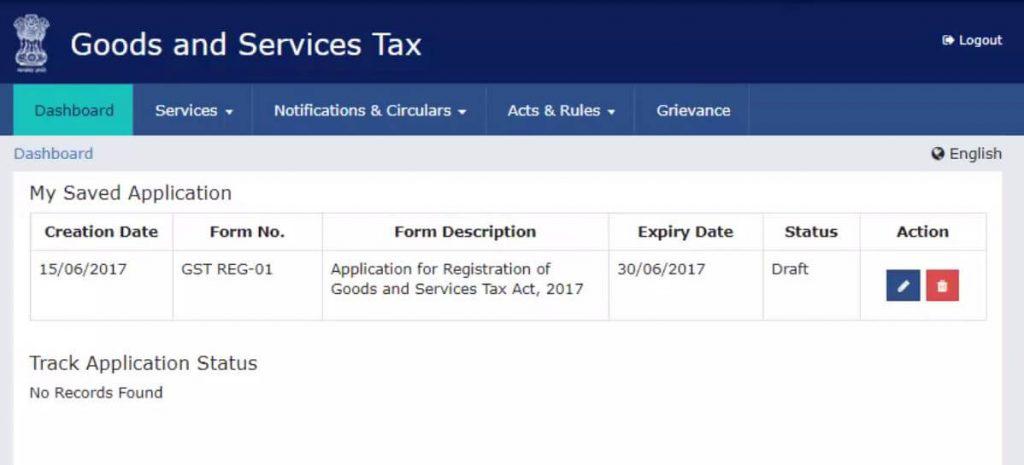
Step 9 – Part B has 10 sections. Fill in all the details and submit appropriate documents.
Here is the list of documents you need to keep handy while applying for GST registration-
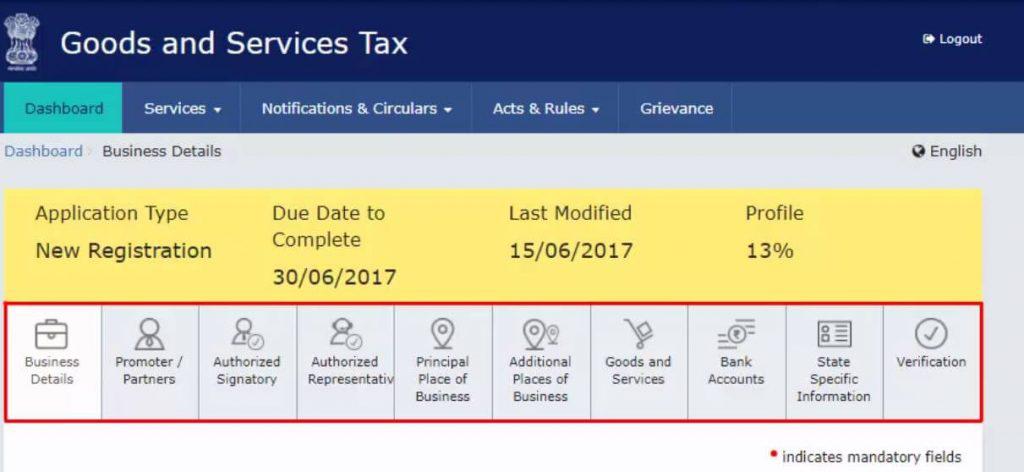
Step 10 – Once all the details are filled in go to the Verification page. Tick on the declaration and submit the application using any of the following ways –

Step 11 – A success message is displayed and Application Reference Number(ARN) is sent to registered email and mobile.
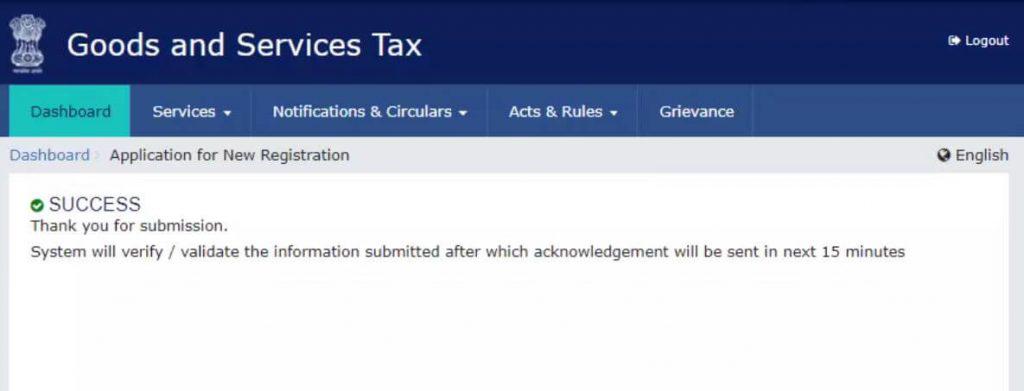
You can check the ARN status for your registration by entering the ARN in GST Portal.
For easier and hassle free GST Registration opt for myCAfilings GST Registration services.
Every dealer whose Annual turnover exceeds Rs 20 lakh (for special states, the amount is Rs 10 lakh) has to register for GST.
Here is a step-by-step guide on how to complete registration process online on the GST Portal–
Step 1 – Go to GST portal. Click on Register Now under Taxpayers (Normal)
Step 2 – Enter the following details in Part A –
- Select New Registration
- In the drop-down under I am a – select Taxpayer
- Select State and District from the drop down
- Enter the Name of Business and PAN of the business
- Key in the Email Address and Mobile Number. The registered email id and mobile number will receive the OTPs.
- Click on Proceed
Step 3 – Enter the OTP received on the email and mobile. Click on Continue. If you have not received the OTP click on Resend OTP.
Get Experts to Register Your Business Under GST
Step 4 – You will receive the Temporary Reference Number (TRN) now. This will also be sent to your email and mobile. Note down the TRN.
Step 5 – Once again go to GST portal. Click on Register Now.
Step 6 – Select Temporary Reference Number (TRN). Enter the TRN and the captcha code and click on Proceed.
Step 7 – You will receive an OTP on the registered mobile and email. Enter the OTP and click on Proceed
Step 8 -You will see that the status of the application is shown as drafts. Click on Edit Icon.
Step 9 – Part B has 10 sections. Fill in all the details and submit appropriate documents.
Here is the list of documents you need to keep handy while applying for GST registration-
- Photographs
- Constitution of the taxpayer
- Proof for the place of business
- Bank account details
- Authorization form
Step 10 – Once all the details are filled in go to the Verification page. Tick on the declaration and submit the application using any of the following ways –
- Companies must submit application using DSC
- Using e-Sign – OTP will be sent to Aadhaar registered number
- Using EVC – OTP will be sent to the registered mobile
Step 11 – A success message is displayed and Application Reference Number(ARN) is sent to registered email and mobile.
You can check the ARN status for your registration by entering the ARN in GST Portal.
For easier and hassle free GST Registration opt for myCAfilings GST Registration services.
Logistics plays an important role in the success of business. Companies that provide services and goods rely on logistics services for the timely delivery of their products to the buyer and the end-user.
ReplyDeleteGST Registration
This comment has been removed by the author.
ReplyDeleteWe at One Point Compliance LLP focus on building long term client relationship through our specialized consulting. In our very first year as legal and regulatory advisor, One Point Compliance LLP has achieved goodwill to be proud of.Trademark Registration in Delhi NCR
ReplyDeleteAwesome information about Online GST Registration Service in Delhi, Keep it up and thanks to share useful blog.
ReplyDeleteGreat Blog! Thanks for sharing your thoughts and it is interested. Keep going. GST
ReplyDeletethank you for sharing this amazing blog this blog is very informative and very good for indian people,its must important to know about the gst i really Appereciated keep continue for awareness of peoples i have raed first time this b log i want to see again this type of blog so keep continue gst registration
ReplyDeleteNice information blogs. Thanks for sharing...
ReplyDeleteAuditing firms in Ambattur
GST Filing and Registration in Ambattur
Accounts and auditing in Ambattur
great information blogs. Thanks for sharing...
ReplyDeleteAuditing firms in Ambattur
GST Filing and Registration in Ambattur
Accounts and auditing in Ambattur
Thanks for sharing this. I was really excited about your daily updates.
ReplyDeleteGST Coaching Center in Chennai | Best Auditor in Chennai | Tax Training Course in Chennai | E-filing Training Classes in Chennai | Tax Training Course in Chennai | Accounting Course in Chennai | GST Registration Consultants in Chennai
Gst registration process is good and anyone easily do it you have create a problem the gst registration online then tradenfill is here to solve it.
ReplyDeleteHello, I'm new to here. Your blog was crystal clear with lots of information.
ReplyDeleteClick here for Gst Registration In Chennai
Awesome read, full of good stuff. Check out this link for more: Gst Return Filing In Chennai
ReplyDelete